In early July, Cloudflare announced changes to the way it manages AI bot traffic, to go live on 15 September 2026.
A fifth to a quarter of websites use Cloudflare services. If yours is one of them, this field guide explains what's changing and how you can ensure you control the right AI bot access for your website.
This is a living field guide and will be updated as needed when Cloudflare's AI settings change. (Last updated: 25 August 2026.)
TL;DR
What's changing
From 15 September 2026:
Cloudflare will classify AI bots in three categories (search, agent, and training).
For existing sites, if the "block AI bots" setting was turned on, training bots will be blocked from all pages. Critically, Cloudflare classifies multi-purpose bots like Googlebot, Applebot, and Bingbot as training bots and will start blocking them.
For new sites, default access rules will block agent and training bots from pages that display ads.
How it affects you
If your site uses Cloudflare and you turned on the old "block AI bots" setting, Cloudflare will start blocking access to the multi-purpose training bots it now classifies as training bots and you may start losing search visibility.
If you are setting up a new site, Cloudflare will apply the new default rules, which will block agent and training bots from pages with ads.
What to do
For existing sites, before 15 September, log in to your Cloudflare dashboard to check the AI bot settings are right for your site. (Our managed hosting clients don't need to do anything; we will do this for you.)
For new sites, review the default AI bot settings and check they are right for your site. (Our managed hosting clients don't need to do anything; we will do this for you.)
What's changing and when
Until now, Cloudflare had an all-or-nothing "block or don't block" setting for AI bots.
Cloudflare is introducing new settings giving users more control over what AI bot activity they want to allow and what they want to block.
Importantly, Cloudflare has decided on default settings for all new sites, which will suit many but not all sites.
If you used the old all-or-nothing "block AI bots" setting, you may lose search visibility from 15 September.
All websites using Cloudflare services are affected
These changes affect websites using Cloudflare services, even if the domain is registered elsewhere.
If you are unsure if your website uses Cloudflare, you can check your domain's NS (nameserver) records - if they end in "cloudflare.net" or "cloudflare.com", your website uses Cloudflare's services. (We can help you check if you don't know how to.)
If you don't use Cloudflare to manage your website's traffic, these changes won't affect you.
Go-live is 15 September 2026
The new settings will go live on 15 September 2026.
You can already choose your settings now in the Cloudflare console but they won't take effect until the go-live in September.
Cloudflare documentation
For more information, see Cloudflare's Block all AI bots documentation.
What happens if you don't do anything
If you don't choose your own settings, Cloudflare's default settings will take effect from 15 September.
If you used the old all-or-nothing "block AI bots" setting, Cloudflare will start blocking bots it classified as training from pages with ads. Critically, Cloudflare classifies multi-purpose bots like Googlebot, Applebot, and Bingbot as training bots and will block them from pages with ads.
This means that, if you used the "block AI bots" setting, you may lose search visibility from 15 September.
Those settings might be right for you, but they might not be.
You need to decide what's best for your site as these settings will affect whether people can find you, whether AI can help users use your website, and whether your content can be used to train someone else's AI.
Understanding the new settings
AI bot activity categories
Cloudflare now classifies AI bot activity into 3 categories:
Search: AI bots reading and indexing your content so they can answer questions about it later, similar to the way search engines like Google index pages to answer searches.
Agent: AI bots using your content in real time to get something done, usually for a real person.
Training: AI bots harvesting your content to train or improve an AI model.
The catch is that Cloudflare takes a very conservative approach when classifying bots, putting them in the most restrictive category that could apply. As a result, it classifies multi-purpose crawlers as training bots and that captures important bots like Googlebot, Applebot, and Bingbot.
Cloudflare settings
The new settings allow users to control for each of these three categories of AI bots whether to: Allow, Block, or Block on pages with ads.
Cloudflare created a setting for pages with ads because advertisers pay for human attention, so site owners with ad-supported pages are more likely to want a say in which bots can access them. (This may or may not be the case for you.)
The new default settings
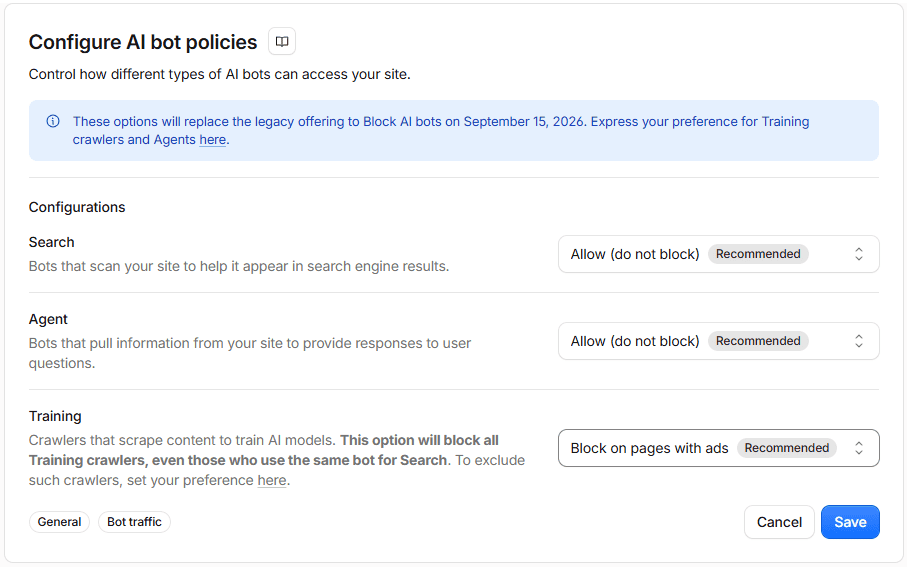
The new default settings will allow search, allow agents, but block agents and training on pages with ads.
This screenshot shows the settings recommended in the dashboard, which differ slightly from those described in Cloudflare's announcement.
Deciding what's best for you
You need to decide what's best for your site. If you prefer something other than the default settings, you should choose your preferred settings before the changes go live on 15 September 2026.
Decide what settings are right for you
Every site is different and you need to decide the right settings for your site.
Search
The litmus test: do you want your content to be found by AI and its users?
Most sites will want to allow AI search bots to index their content so they can be found when relevant. If you don't want AI search bots indexing your site, you probably don't want regular search bots indexing your site either.
Agent
The litmus test: do you want AI to be able to use your content to answer user queries (even if not attributed)?
Most sites will want to allow AI agents to use their content to answer queries. The strong exception would be where you need to prevent agentic use of your content or processes; for example, on membership-based or subscription-based services.
Training
The litmus test: do you want AI to be able to use your content to improve its knowledge generally, and do you want multipurpose bots accessing your content?
If your site contains deep knowledge and IP that you need to protect you probably won't want to allow it to be used to train other people's AI for free.
However, if you want to your knowledge to be freely available - for example, awareness or advocacy campaign content common in government and not-for-profit sectors - you likely want AI to use your content for training so it becomes part of its world-knowledge.
If this applies to you, you will want to change the default settings or your knowledge will be excluded from AI training if it sits on pages Cloudflare thinks have ads.
The catch is that Cloudflare takes a very conservative approach when classifying bots, putting them in the most restrictive category that could apply.
As a result, it classifies multi-purpose crawlers as training bots and that captures important bots like Googlebot, Applebot, and Bingbot. If you block training bots, you'll also be blocking these bots from indexing your site for search as well as AI training.
How to change your settings
If you want to change from the default settings, log in to the Cloudflare dashboard and navigate to Security / Settings and choose the Bot traffic tab.
You should see a panel titled "Configure AI bot policies" like the one pictured below. Choose your preferred settings here.
You should also see a panel with the legacy all-or-nothing setting, titled "Block AI bots [Deprecating on September 15]".
For devs: overrides
For developers, there's one technical detail worth remembering: a Web Application Firewall (WAF) block or Cloudflare's Bot Fight Mode will override a robots.txt allow rule.
If you've turned on Bot Fight Mode or set up a custom WAF rule to block a crawler, then those will override these AI bot settings.
What we're doing for clients
We're reviewing Cloudflare's AI bot settings for all our managed hosting clients as part of our regular health checks this quarter. We will discuss with clients any sites that need special consideration about the best settings.
Contact us
Need help?
If you need help working out the right AI bot settings for your needs, or need someone to manage your Cloudflare managed domain, we're here to help.
Get in touch